
Odoo 19 is just around the corner, and the buzz is growing. With Odoo Experience 2025 happening earlier than usual (18–20 September in Brussels), we're bringing in news directly from Belgium to Australia!
Bookmark this Blog, as we'll keep updating this Blog as we discover the most exciting features!
Quick Navigation
Use this section to quickly navigate to the features that are important for YOUR business!
Summary:
- Smarter tax suggestions factoring in deductibility.
- Cleaner, mobile-friendly bank reconciliation.
- PEPPOL eInvoicing integration.
- Annual reports, audit trails, and improved PDF layouts.
- Improved Australian localisation updates for GST/BAS compliance.
- ATO Compliance for Odoo Payroll App

Summary:
- Unified UoM and packaging into one model.
- Multi-level package tracking with roll numbers.
- New Inventory Dashboard with smart suggestions.
- New Replenishment Screen
- Revamped Product Forecast Screen
Summary:
- Multi-packaging Management: Products stored in Boxes, which are in-turn stored in Pallets.
- Products and Customer Related Notes on the Barcode App
- Better Guidance for Warehouse Operations
- Product Source Locations
Summary:
- Default batch sizes on BoMs for streamlined order creation.
- Updated BoM overview and simplified work center capacity.
- New Gantt view for easier scheduling and tracking of MOs.
- Editable MO deadlines and more user-friendly order splitting.
- Multiple serial/lot numbers generated from a single MO.
- Operation costing based on either real usage or fixed cost.
- Work center employee hourly costs applied to valuations.
- Subcontracting now supports standard inventory receptions.
- Editable work order statuses with improved filtering and search.
- Redesigned Shop Floor App
Summary:
- Sections Revamp: Hide prices/products in sales workflows.
- CRM: scan business cards → instant lead creation.
eCommerce:
- New checkout options (UoM selector, improved Click & Collect).
- Google Merchant Center, TikTok, and Shopee integrations.
- SEO boosts: cleaner URLs, structured data, faster indexing.
- Loyalty programs refreshed with flexible discount rule.
Summary:
- Refactored payroll with improved inputs and record history.
- Confirmed Australian payroll localisation.
- Time Off: refreshed UI, support for public holidays.
- Recruitment: new talent pool management.
Summary:
- Assign project roles when setting up tasks.
- Launch projects from task templates with auto-scheduling.
- Helpdesk: tickets auto-dispatched by tag.
- Field Service: location tracked while timer runs.
Summary:
- AI agents available across apps for smarter workflows.
- Live voice transcription → automatic meeting summaries.
- AI-powered automations with Studio and server actions.
- Faster mobile & desktop UI performance.
- New spreadsheet visualisations: Geo charts, funnels, treemaps.

Why Odoo 19 Matters for Australian Businesses
Each new Odoo release builds on the platform’s strength, but Odoo 19 is shaping up to be especially valuable for Aussie companies:
- Accounting & Payroll: Enhanced compliance for GST, BAS, and Australian payroll.
- Retail & eCommerce: More integrations (Google, TikTok, Shopee, Lazada) and better SEO.
- Manufacturing & Inventory: Smarter costing, traceability, and shop floor tools.
- Services & Projects: More flexible planning and automation for service businesses.
- AI & Automation: Built-in AI agents and live meeting transcripts to save time.
At WMSSoft, we don’t just install Odoo. We deliver with our FastTrack MVP approach — getting your business live quickly, showing real wins fast, then scaling up.
Finance & Accounting 💰
GST/BAS Compliance Improvements
A new tax return feature has been introduced, supporting fiscal return obligations and deadlines and automated validation checks to ensure accurate filings. The feature is customizable to meet localization needs across different regions.

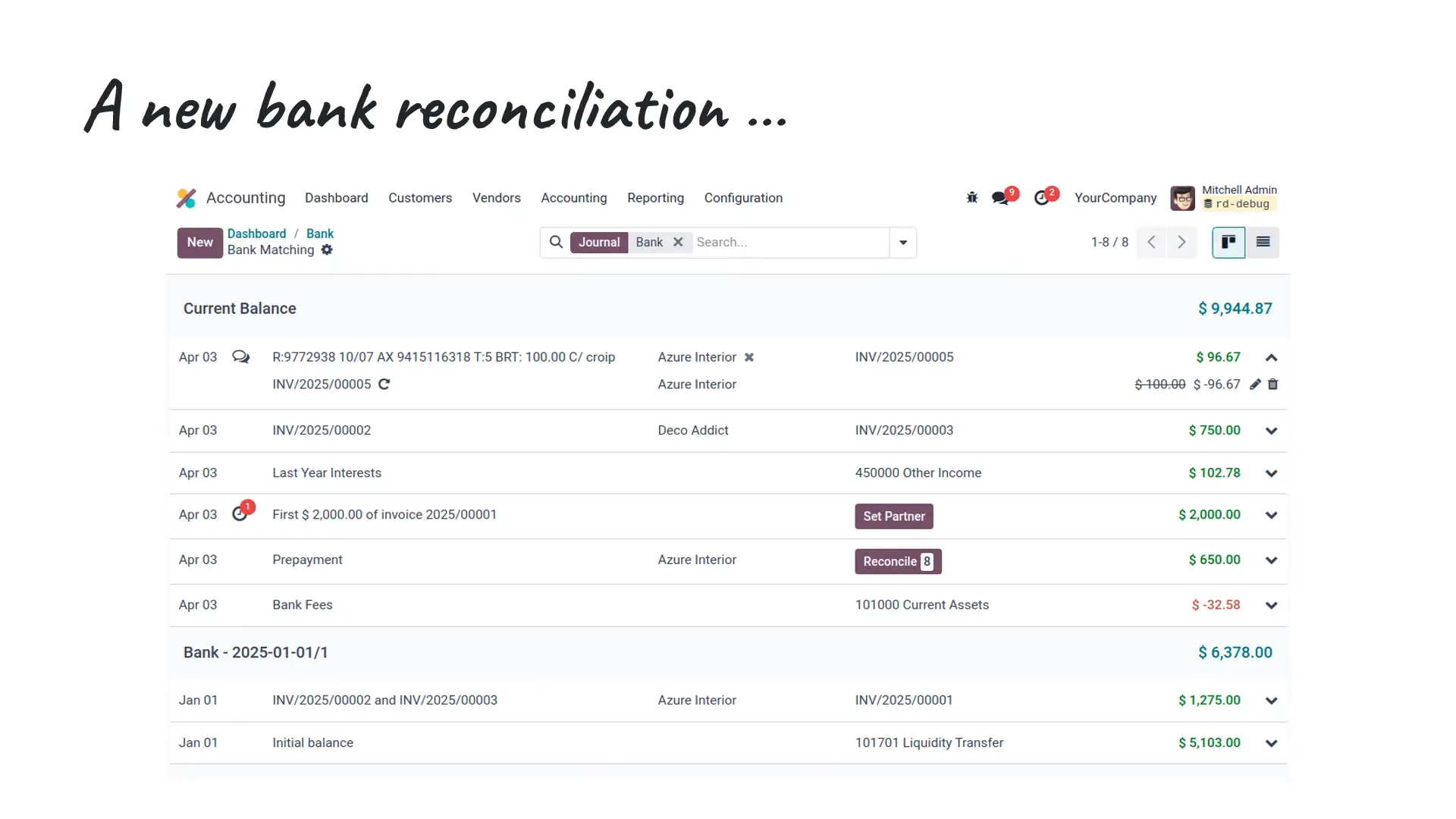
Revamped Bank Reconciliation (mobile-friendly UI)
The entire Bank Reconciliation Screen has been revamped. The previous section where the bank transactions would be displayed has now been removed.
Draft entries can now be reconciled. Eventual automatic moves (like currency exchange or cash basis moves) are created in draft simultaneously with the reconciliation. When posting the original entry, the reconciliation is automatically confirmed as well.
Fiscal Positions
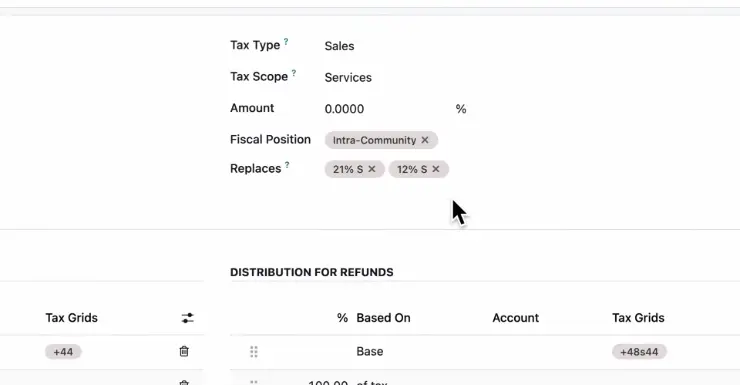
Odoo 19 has overhauled how fiscal positions and tax mappings work. Instead of manually setting up replacement rules, each tax now clearly defines where it applies and which other taxes it replaces (for example, an export tax can automatically replace domestic sales tax).
This means:
- Invoices automatically filter the right taxes based on fiscal position.
- Products default to domestic fiscal rules, with others applied when relevant.
- Multiple localisations are streamlined into a single “Domestic” fiscal position.
- Replaced taxes are hidden by default, reducing clutter, while others remain accessible when needed.
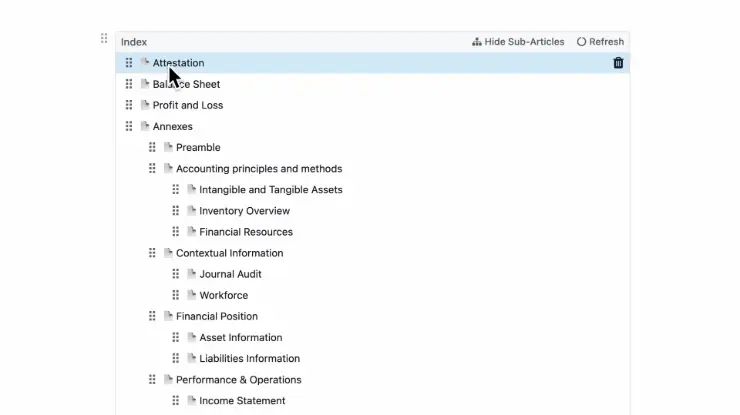
Cleaner reporting engine & audit-ready designs
We are committed to providing exceptional support and resources to help you succeed with our platform.
ATO Payroll Compliance
For the first time, Odoo 19 delivers full Australian payroll compliance straight out of the box. This includes support for Single Touch Payroll (STP Phase 2) and SuperStream, provided via a clearing house integration, and all security requirements mandated by the ATO.
Key features include:
- ATO-compliant updates to the 2025–2026 financial year tax rules (from July 1, 2025).
- Support for varied withholding rates (e.g., cents per km, laundry, travel allowances, overtime meal allowances).
- Payroll taxes (W1–W5) included directly in the BAS report closing.
- Import YTD balances across multiple income streams (e.g., working holiday makers + salary & wages).
- Seamless handling of backpay and salary sacrifice directly on payslips.
For Australian businesses, this means payroll in Odoo is now completely aligned with ATO requirements, reducing risk, saving time, and eliminating the need for third-party add-ons.
And Many More Accounting Improvements...
The improvements are endless, and here's a summary of the Accounting Improvements
Account Selection
- Accounts now include descriptions to guide correct use.
- Default taxes apply only to invoices and bills, not miscellaneous entries.
Context-based suggestions:
- Invoices → income accounts
- Bills → expense or fixed asset accounts
- Users can override suggestions if needed.
Analytics / Analytical Accounts
Analytical Accounts have been simplified:
- The management of the hierarchy of analytic subplans in budgets and analytic reports has been improved.
- Use budgets without installing the Purchase app, for simple budgeting without committed amounts.
Bank and Statements
- OCR Corrections → Fix starting and ending balances directly in digitised statements.
- PDF Previews → View attached documents in the bank transaction list.
- Draft Entries → Reconcile draft moves automatically, confirmed once the original entry is posted.
- Simplified Write-Offs → Fully reconcile or write off partially reconciled items in a few clicks.
- Keyboard Shortcuts → Speed up reconciliation with quick commands.
Follow-ups
WhatsApp reminders, new overdue invoice report, and more granular control over which moves are included.
Invoices & Payments
New debit note button, improved down payment account settings, default recipient bank account logic, enhanced invoice analysis measures, and ISO20022 updates.
General Usability
Refreshed journal/reconciliation forms, improved print/send wizard, report annotations in chatter, and separate invoice line display settings for sales vs purchases.
📦 Inventory Management
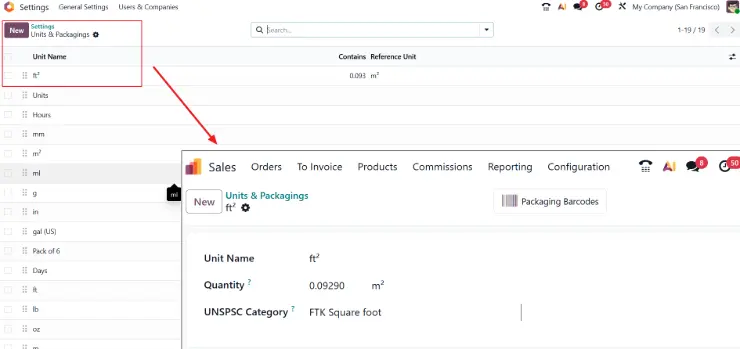
Simplified Products and Packaging
Product units and product packagings are merged into one simplified model. UoM categories have been removed.
Smarter Replenishment and Make-to-Order (MTO) Handling
The replenishment view now displays default values in previously empty columns (e.g., Route, Vendor, etc.). This allows to filter by vendor to quickly identify rules that already use a specific vendor by default and rules that can be changed to use that vendor to fulfill an order.
The MTO Route also now can be directly activated on the settings menu.

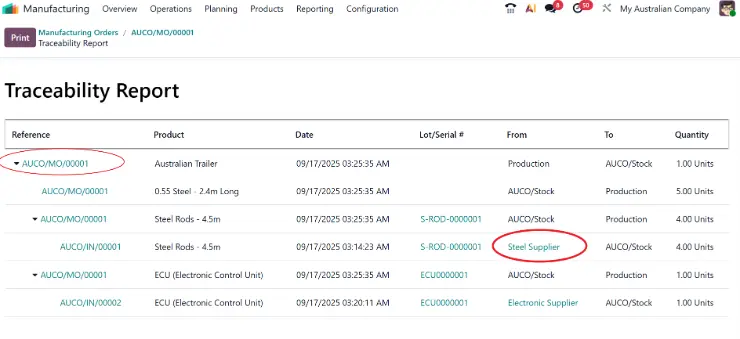
Better Traceability Reports
Improved traceability reports by displaying vendor and customer names as well as warehouse short codes.
For Australian businesses balancing multiple warehouses and compliance requirements, this means clearer tracking and easier audits.
Replenishment Horizon
Odoo 19 enhances reordering with a horizon setting (default 365 days), a deadline field to show the last date to reorder before hitting minimum stock, and data previews such as order frequency and average stock.
The system now uses vendor pricelist or BoM units to calculate order multiples, preventing understock by allowing quantities to exceed maximums when needed.

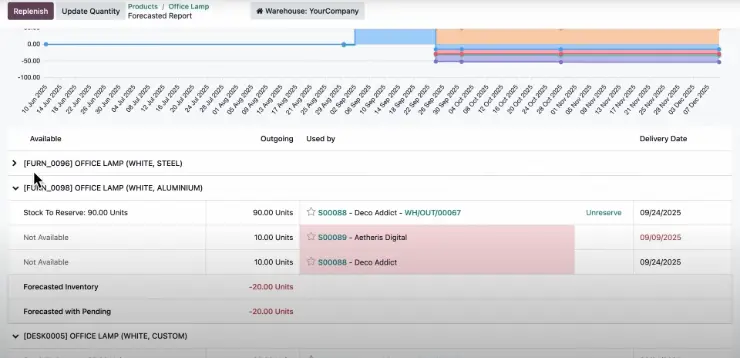
Better Forecast Reports
The product forecast screen has been redesigned:
- On the top right we now see Days to Replenish
- When you scroll down, you'll now see variants grouped together.
- The delivery date column is now highlighted in RED, when delivery is late.
📲 Barcode (Warehouse Management)
Simplified Products and Packaging
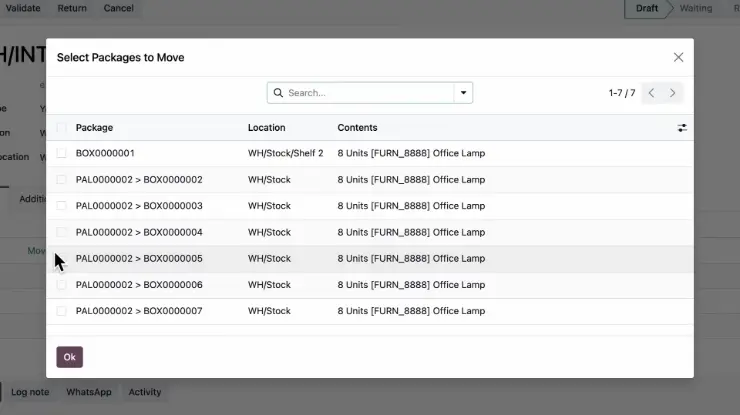
Packages can now exist within each other. This means that you can now store a Product within a Box, which in turn can be stored into a Pallet.
Operations Descriptions
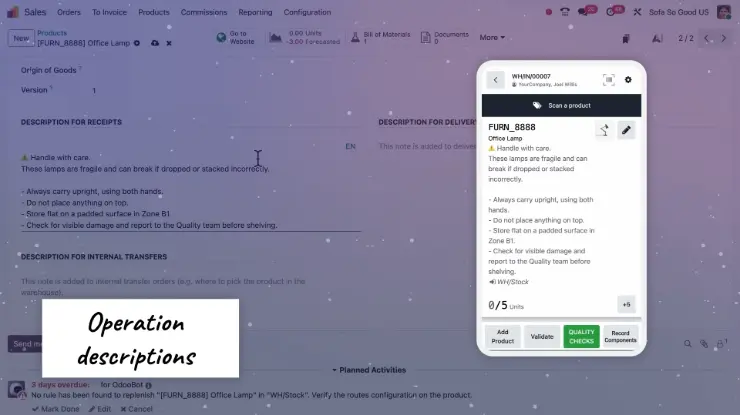
Get instructions for receipts, internal transfers, and deliveries of products directly in the Barcode app.
Better Guidance
Clearer instructions for Warehouse Staff to follow. Better .
View and edit the properties of a lot or a serial number from the Barcode app.

🏭 Manufacturing & Shop Floor
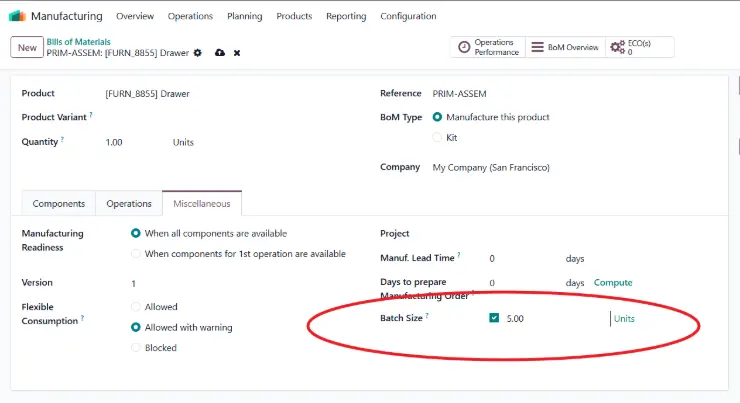
Default Batch Sizes
Set a default batch size on bills of materials to preset the quantity on new manufacturing orders.
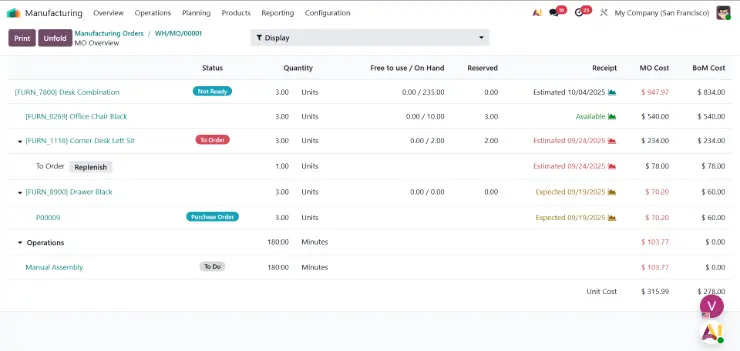
Updated BOM Overview
The bill of materials overview has been updated and the work center capacities have been simplified.
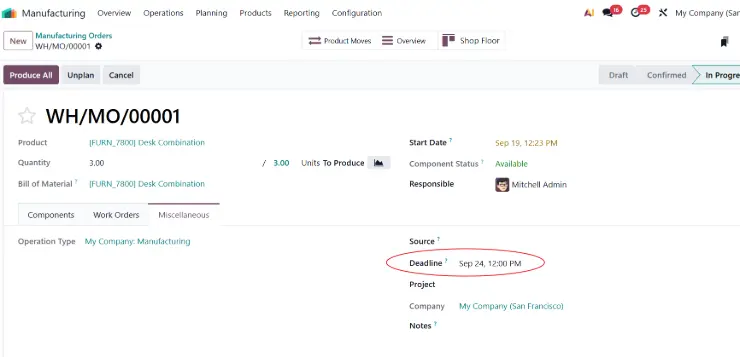
Manufacturing Order UX
- An editable MO deadline field has been added on the manufacturing order form.
- The Consumed checkbox column has been removed.
- The list icon on move lines has been replaced by a clickable "Pick" link for all stock moves.
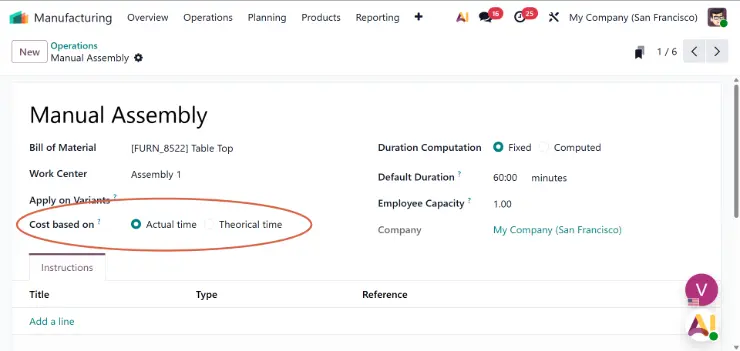
Operation Costing
Determine how manufacturing operations are valued: based on real usage or at a fixed cost.
🛒 Sales
Sale Order Sectional Revamp
Hide prices/products in sales workflows.

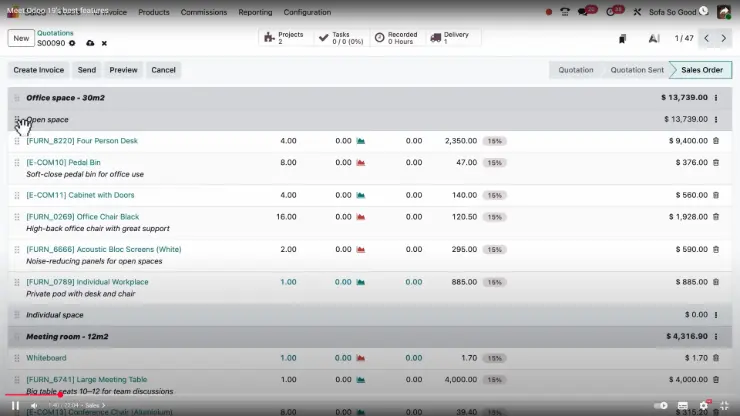
Sub-Sections
Now you can add Sections within Sections and then choose multiple actions on what to do with these sections.
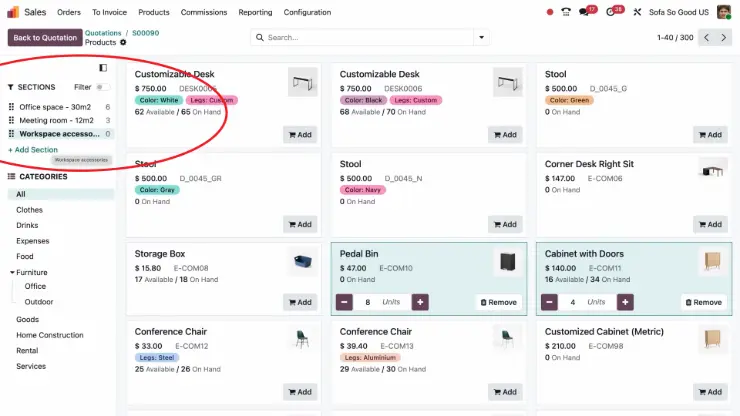
Sections: Add Via Catalogue Screen
Adding sections from the Catalogue screen makes it easy for users who are on the go to neatly create a Sale order efficiently.
Partial payments on user portal
Partial payments for customer invoices are now handled in the customer portal, allowing down payments or partial payments according to payment terms and enabling full payment when desired.

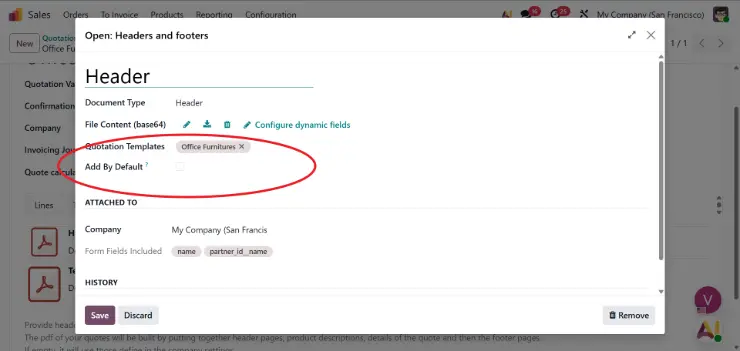
Quote builder: default headers/footers
Set default headers and footers for the quote builder.
🛒 CRM
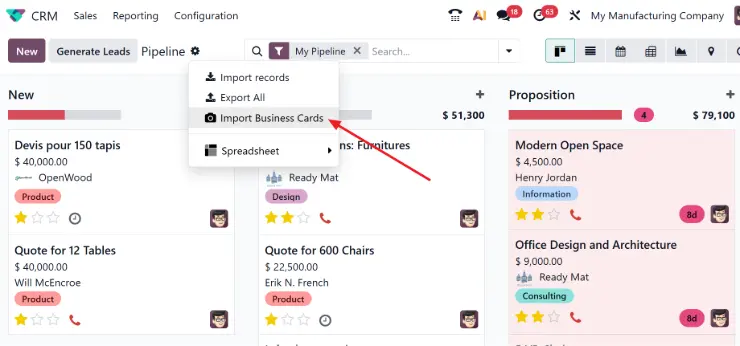
Scan Business Cards
Directly Scan Business Cards to create CRM Opportunities
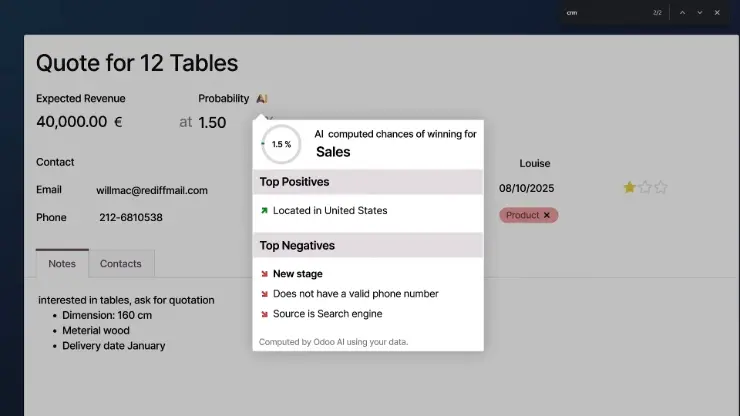
AI Probability
The Probability of winning a deal has been upgraded to be calculated using AI.
It now shows the Positive and the Negative Factors responsible for the Probability allowing Salespeople to work on improving these numbers.
Sections: Add Via Catalogue Screen
Adding sections from the Catalogue screen makes it easy for users who are on the go to neatly create a Sale order efficiently.
Partial payments on user portal
Partial payments for customer invoices are now handled in the customer portal, allowing down payments or partial payments according to payment terms and enabling full payment when desired.
Quote builder: default headers/footers
Set default headers and footers for the quote builder.